
Cubtale: Pregnancy & Baby
CubtaleParenting
4.3223.00 Reviews
- Version
- 4.8.3
- Installs
- 50.00K
- Age Rating
- Everyone
Screenshots
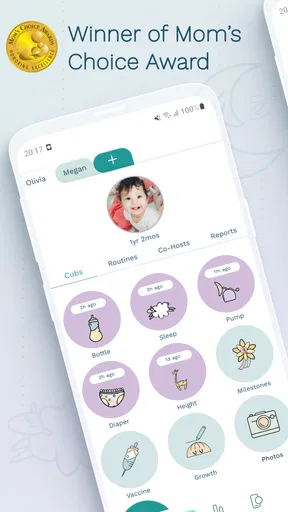
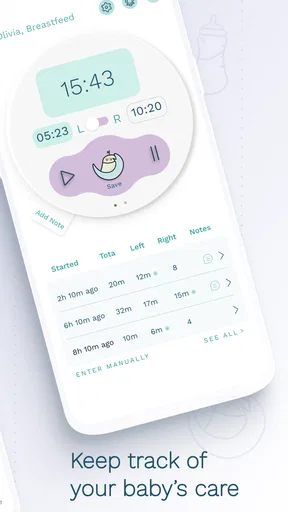
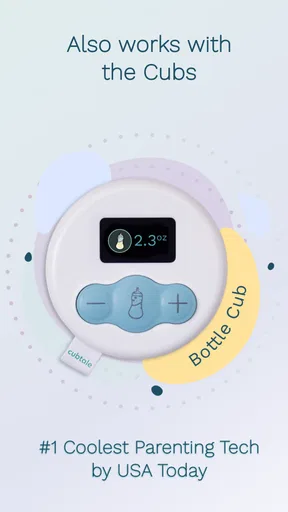
Our Review of Cubtale: Pregnancy & Baby
 Analysis by Appyee
During a busy day with a baby, small details can be surprisingly easy to lose: when the last feed happened, whether a diaper change was before or after a nap, or what to tell a caregiver at handoff. Cubtale Baby Tracker is built around keeping those everyday notes together. I see its value less as a source of parenting advice and more as a shared record that can help a tired household remember what happened.
A quick record, not another parenting rulebook
The most useful way to approach a tracker like this is to decide what you actually need to remember. If feeding times are the main challenge, begin there rather than trying to log every activity from day one. A short, consistent record is often more useful than an ambitious one that becomes another task to keep up with. You can add sleep, diaper changes, and growth details when those become relevant to your routine.
That distinction matters because tracking can either reduce mental load or create more of it. I would use the app to answer practical questions—when did the last bottle happen, how long was the recent nap, what information should I pass on?—not to judge whether a baby’s day followed a perfect pattern. A log is a memory aid, not a measure of parenting skill.
Where it fits into a real day
Picture a parent handling a morning feed while another adult is getting ready to take over. Instead of relying on a hurried verbal recap, the parent can record the feed and leave the next caregiver with a clearer timeline. Later, if the baby’s routine seems different, the household has a sequence to look back at rather than several half-remembered conversations.
For night care, the same idea can be helpful, provided recording an event stays quick enough not to disrupt settling the baby. I would keep the most-used tracking items easy to reach and avoid entering every optional detail when half-asleep. The best routine is the one the adults can maintain on ordinary, messy days—not just on a calm afternoon when there is time to organize everything.
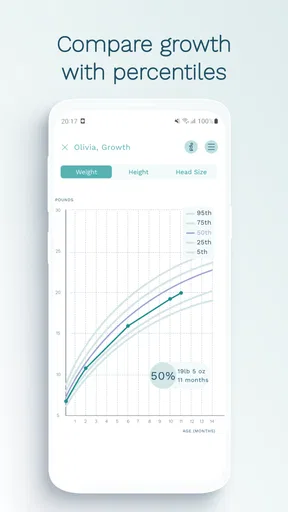
Growth notes are a different kind of record from feeds and naps. They are useful when you want measurements in one place to discuss with a health professional, but I would not treat a chart in an app as a diagnosis or a substitute for clinical guidance. The practical benefit is having your own past entries available, especially when a question comes up between appointments.
Sharing works best with a clear household routine
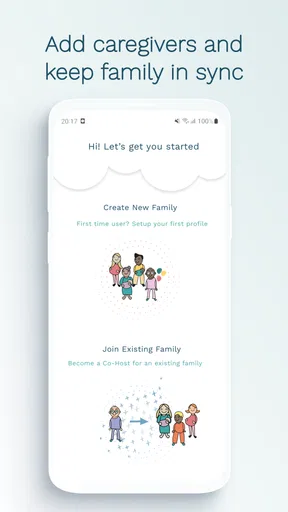
A shared tracker can help when more than one adult cares for the baby, but the benefit depends on everyone using it in roughly the same way. Before inviting another caregiver, agree on which events are worth logging and how much detail is enough. Otherwise, one person may enter every small observation while another records only feeds, leaving a timeline that is technically shared but hard to interpret.
I would also make handoffs explicit: use the record to support a brief conversation, not replace one. A tracker can show that an event was logged; it cannot convey every detail about how the baby seemed or what the next caregiver should watch for. For babysitters or relatives who only help occasionally, a simple spoken summary may be easier than asking them to learn a new routine in the middle of a visit.
Compared with notes, memory, and a basic timer
The usual alternatives are a paper notebook, a phone note, a timer, or simply asking the other caregiver. Those options can be perfectly adequate. A notebook is flexible and does not require learning an app, while a basic timer is faster if all you need is a reminder about one event. The appeal here is having several kinds of baby-care records together rather than scattering them across different places.
That all-in-one approach has a trade-off: a dedicated tracker asks you to maintain a little system. If you only want to note occasional feeds, a paper page or a simple note may be less effort. If several caregivers need a consistent history, a purpose-built tracker is more compelling, assuming its workflow suits everyone involved. I would choose based on the problem you are trying to solve, not on how many possible fields an app offers.
First Impressions
When I first opened the app, I was greeted with a user-friendly interface. It’s clean, intuitive, and doesn’t bombard you with unnecessary distractions. The app seems to understand that as a parent, you need things to be quick and efficient. Setting up your baby’s profile is a breeze, and you can add multiple profiles if you’re blessed with twins or more.
Features That Stand Out
One of the coolest features is the ability to track everything you could possibly imagine. Seriously, everything. Feedings, diaper changes, sleep schedules, and even tummy time can be logged with just a few taps. The app also allows you to set reminders, which is perfect for those 3 a.m. feedings when your brain feels like mush.
Another feature I found super handy was the growth tracking tool. You can log your baby’s weight, height, and head circumference, and the app will plot them on a growth chart. It’s like having a pediatrician in your pocket who doesn’t give you a side-eye when you forget something.
Keeping the record useful under pressure
For speed, I would not try to capture every detail the first time I use the app. I’d start with the few events I most often forget, then see whether adding more makes the record more useful or just slows me down. This is especially relevant during night feeds: even a small amount of extra tapping can feel like too much when you are trying to get back to sleep.
It also helps to decide what a reminder should do for you. A prompt can be a helpful nudge when a routine is easy to lose track of, but reminders are not a substitute for responding to the baby in front of you. If notifications begin to feel like pressure rather than support, I would simplify the routine and keep only the prompts that genuinely help.
Syncing and Sharing
Now, I know what you’re thinking. "Okay, but what if my partner wants to know all this too?" No worries! Cubtale Baby Tracker allows you to sync data across multiple devices. You can invite your partner, grandparents, or even the babysitter to the app, ensuring everyone is on the same page. It’s like a family meeting without the awkward silences.
For households with twins or more than one baby profile, keeping entries attached to the right child is the small habit that makes the history useful later. I would check the selected profile before logging, particularly during a hectic handoff. A tidy record only helps if everyone can tell whose feed, nap, or measurement they are looking at.
Customization and Insights
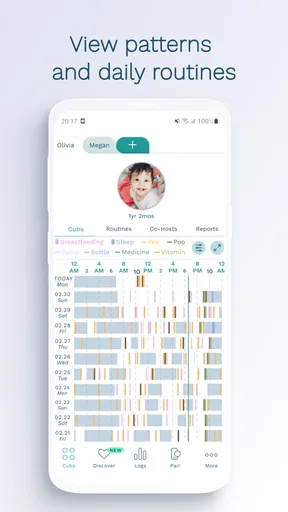
Customization is another strong suit of this app. You can personalize the dashboard to focus on what matters most to you. If you’re someone who obsesses over nap times, you can give that feature prime real estate on your screen. Plus, the insights feature provides a neat summary of your baby’s activities, helping you spot patterns or anomalies. It’s like having an AI that whispers, "Hey, did you notice your baby sleeps better after a bath?"
I would treat any apparent pattern as a prompt to pay attention, not proof that one event caused another. Babies’ days can vary, and a handful of entries may not tell the whole story. The more useful question is whether a summary helps you describe a recurring routine or prepare a clearer conversation with another caregiver or a clinician.
Room for Improvement
No app is perfect, and this one is no exception. While it excels in many areas, I did notice a couple of hiccups. Occasionally, the app would lag when switching between tabs, which can be frustrating when you’re in a hurry. Also, some parents might find the array of options overwhelming at first, but I promise it gets easier with use.
Reliability, phone fit, and cost
Because logging is most valuable when it becomes a habit, occasional lag is more than a cosmetic annoyance: it can make a quick entry feel like one more obstacle. If the app feels slow at a particularly busy moment, I would prioritize recording the essentials and avoid trying to complete a detailed history all at once. I can’t promise how it will behave on every phone or under every network condition, so I would judge the experience on the device and connection you actually use.
The app is listed for Android with a minimum OS requirement of 6.0, which makes the operating-system version worth checking before installing it on an older phone. It is free to download, with in-app purchases priced from $2.99 to $139.99 per item. I would look over any purchase prompt carefully and decide whether the free experience already covers your household’s needs before paying for anything.
It is a parenting app from Cubtale, rated for Everyone, and its current version is 3.15.0. The app has a 4.7 average from around 1.5K ratings, with 10K+ installs. Those figures suggest that other parents are using it, but they cannot tell you whether its pace, layout, or tracking habits will suit your own family; a short trial with a few essential entries is a better test.
Room for Improvement
No app is perfect, and this one is no exception. While it excels in many areas, I did notice a couple of hiccups. Occasionally, the app would lag when switching between tabs, which can be frustrating when you’re in a hurry. Also, some parents might find the array of options overwhelming at first, but I promise it gets easier with use.
If you prefer not to store routine notes in an app, or you know that logging will become a source of guilt, a paper notebook or a brief shared note may be a better fit. The same is true if you need a clinical tool rather than a household record: this tracker can help organize what you observed, but it should not decide whether a health concern needs attention. Its strongest case is practical coordination, not replacing professional advice.
The Verdict
In conclusion, Cubtale Baby Tracker is a solid choice for any parent looking to streamline their baby tracking in a digital format. It’s packed with features, easy to use, and, best of all, customizable to fit your needs. Whether you’re a first-time parent or a seasoned pro, this app makes tracking baby activities one less thing to worry about. So go ahead, give it a whirl, and enjoy having a little more sanity in your parenting journey.
Who will get the most from it
I’d recommend it most to parents who want feeds, sleep, diaper changes, and growth notes in one place, especially when care is shared across adults. It may also suit someone who finds that tiredness makes details blur together and wants a record to consult later. I would skip it if you only need a single timer, strongly prefer paper, or find that tracking increases your stress rather than easing it.
My practical starting point would be to set up the baby profile, choose one or two high-value activities, and use those consistently for a few days. Then decide whether the summaries, reminders, and shared access are helping enough to justify adding more. That keeps the app in its proper role: a flexible memory aid for everyday care, not another standard you have to meet.
Verdict
Strengths of Cubtale: Pregnancy & Baby
- User-friendly interface for easy navigation.
- Comprehensive tracking of baby activities.
- Customizable reminders for daily tasks.
- Secure data storage and privacy features.
- Cross-device sync for seamless access.
Limitations of Cubtale: Pregnancy & Baby
- Limited free features; premium needed.
- Occasional sync delays between devices.
- No offline mode for data entry.
- Some features require manual input.
- Ads can be intrusive in free version.
Similar Picks in This Category
View All
Family Space
Motorola Mobility LLC.3.9

شرطة الأطفال - مكالمة وهمية
Oub Apps4.1

Findmykids: Parental Control
LETEM LTD4.6

Pregnancy + | Tracker App
Philips Electronics UK Limited4.8

Policía de niños - para padres
Kids police4.7

Pregnancy App
Amila4.9
Frequently Asked Questions
What is Cubtale Baby Tracker and how does it work?
Cubtale Baby Tracker is a comprehensive app designed to help parents track their baby's daily activities, including feeding, sleeping, diaper changes, and more. By logging these activities, parents can monitor their baby's growth and development. The app offers an intuitive interface and supports multiple caregivers, allowing seamless updates and data sharing.
Is Cubtale Baby Tracker available for both Android and iOS devices?
Yes, Cubtale Baby Tracker is available for download on both Android and iOS platforms. You can find it on the Google Play Store for Android devices and the Apple App Store for iOS devices. The app ensures cross-platform compatibility, making it easy for all family members to stay updated on a baby’s activities.
Does Cubtale Baby Tracker offer any premium features?
Cubtale Baby Tracker offers both free and premium features. While the free version includes essential tracking capabilities, the premium version provides additional features such as detailed analytics, personalized tips, and extended data storage. This allows for a more customizable experience to suit various parenting needs.
How secure is the data stored in Cubtale Baby Tracker?
Cubtale Baby Tracker prioritizes user privacy and data security. The app uses encryption to protect data and follows strict security protocols to ensure that sensitive information about your baby and family is safeguarded. Users can rest assured that their data is stored securely and accessed only by authorized parties.
Can multiple caregivers use Cubtale Baby Tracker simultaneously?
Yes, Cubtale Baby Tracker supports multiple caregivers, allowing parents, grandparents, and babysitters to log activities and access the baby's data. This feature ensures that all caregivers are on the same page, providing consistent care for the baby and simplifying communication among family members.
